Quick Start Guide
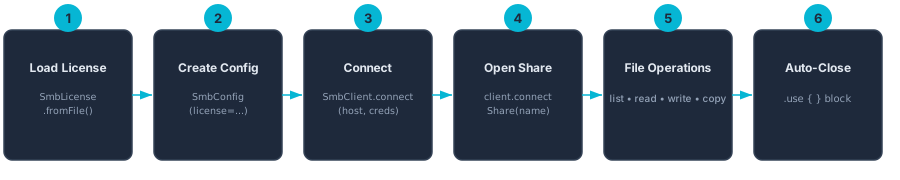
Get up and running with smb-kotlin in minutes. This guide shows complete, working examples for both JVM server applications and Android apps, plus common file operations you'll use every day. Keywords: kotlin smb example, connect smb share kotlin, smb file operations, android smb client
JVM / Server
A minimal Kotlin program that connects to an SMB share and lists the root directory. This is the fastest way to verify your setup.
import com.ctreesoft.smb.api.*
import kotlinx.coroutines.flow.toList
import kotlinx.coroutines.runBlocking
import java.io.File

fun main() {
    // 1. Load your license
    val license = File("smb.lic").readText()

    // 2. Create credentials and config
    val credentials = NtlmCredentials(
        username = "alice",
        password = "s3cret",
        domain   = "WORKGROUP"
    )
    val config = SmbConfig(license = license)

    // 3. Connect, open a share, and list the root directory
    runBlocking {
        SmbClient.connect("192.168.1.100", credentials, config).use { client ->
            client.connectShare("Documents").use { share ->
                val entries = share.listDirectory("/").toList()
                entries.forEach { entry ->
                    println("${entry.name}  (${entry.size} bytes, dir=${entry.isDirectory})")
                }
            }
        }
    }
}SmbClient.connect() and connectShare() both
return resources that implement AutoCloseable. Always use .use {}
blocks to ensure connections are closed properly.
Android
On Android, run SMB operations off the main thread. Here is a complete
ViewModel example using viewModelScope and Dispatchers.IO.
import android.app.Application
import androidx.lifecycle.AndroidViewModel
import androidx.lifecycle.viewModelScope
import com.ctreesoft.smb.api.*
import kotlinx.coroutines.Dispatchers
import kotlinx.coroutines.flow.*
import kotlinx.coroutines.launch

class FileListViewModel(app: Application) : AndroidViewModel(app) {

    // Expose file list as StateFlow for Compose / XML observers
    private val _files = MutableStateFlow<List<SmbFileEntry>>(emptyList())
    val files: StateFlow<List<SmbFileEntry>> = _files.asStateFlow()

    private val _error = MutableStateFlow<String?>(null)
    val error: StateFlow<String?> = _error.asStateFlow()

    fun loadFiles(host: String, shareName: String, path: String) {
        viewModelScope.launch(Dispatchers.IO) {
            try {
                // Load license bundled in assets/
                val license = getApplication<Application>()
                    .assets.open("smb.lic")
                    .bufferedReader()
                    .readText()

                val credentials = NtlmCredentials(
                    username = "alice",
                    password = "s3cret",
                    domain   = "WORKGROUP"
                )
                val config = SmbConfig(license = license)

                SmbClient.connect(host, credentials, config).use { client ->
                    client.connectShare(shareName).use { share ->
                        val entries = share.listDirectory(path).toList()
                        _files.value = entries
                    }
                }
            } catch (e: SmbException) {
                _error.value = e.message
            }
        }
    }
}smb.lic file in
app/src/main/assets/ so it ships inside the APK and can be read
with assets.open().
Basic File Operations
Once you have an SmbShare reference, here are the most common operations.
All of these are suspend functions and must be called from a coroutine scope.
List a Directory
listDirectory() returns a Flow<SmbFileEntry>, so you can
collect results lazily or convert to a list.
// Collect lazily
share.listDirectory("/reports/2025").collect { entry ->
    println(entry.name)
}

// Or grab everything at once
val allFiles = share.listDirectory("/reports/2025").toList()
Read a File
readFile() returns an Okio Source for efficient streaming reads.
import okio.buffer

share.readFile("/reports/quarterly.pdf").use { source ->
    val buffered = source.buffer()
    val bytes = buffered.readByteArray()
    File("local-copy.pdf").writeBytes(bytes)
}
Write / Upload a File
writeFile() returns an Okio Sink you can write bytes into.
import okio.buffer
import okio.source

val localFile = File("presentation.pptx")

share.writeFile("/shared/presentation.pptx").use { sink ->
    val buffered = sink.buffer()
    localFile.source().use { fileSource ->
        buffered.writeAll(fileSource)
    }
    buffered.flush()
}
Create a Directory
share.createDirectory("/shared/new-folder")Delete a File
share.delete("/shared/old-report.xlsx")Copy a File on the Server
Server-side copy avoids downloading and re-uploading the file.
share.copyFile(
    source      = "/templates/invoice.docx",
    destination = "/invoices/2025/march.docx"
)
Rename / Move a File
share.rename(
    source      = "/drafts/proposal.docx",
    destination = "/final/proposal-v2.docx"
)
Error Handling
smb-kotlin provides specific exception types so you can react to each failure mode
individually. All exceptions extend SmbException, which serves as a catch-all.
try {
    SmbClient.connect(host, credentials, config).use { client ->
        client.connectShare("SecureShare").use { share ->
            val data = share.readFile("/secret/report.pdf").use { source ->
                source.buffer().readByteArray()
            }
            File("report.pdf").writeBytes(data)
        }
    }
} catch (e: SmbAuthenticationException) {
    // Wrong username, password, or domain
    println("Authentication failed: ${e.message}")
} catch (e: SmbConnectionException) {
    // Network unreachable, host down, timeout
    println("Connection error: ${e.message}")
} catch (e: SmbFileNotFoundException) {
    // Path does not exist on the share
    println("File not found: ${e.message}")
} catch (e: SmbAccessDeniedException) {
    // Authenticated but insufficient permissions
    println("Access denied: ${e.message}")
} catch (e: SmbException) {
    // Catch-all for any other SMB error
    println("SMB error: ${e.message}")
}SmbException should be last since it is the parent of all smb-kotlin exceptions.
Next Steps
- Android Integration — ProGuard rules, lifecycle management, and Compose UI patterns
- API Reference — Full documentation for every class and method
- Complete Examples — Real-world patterns including recursive directory walks, progress tracking, and batch operations
- SMB3 Encryption — Enable end-to-end encryption for sensitive data